
Choosing the right website architecture becomes more difficult as traffic, content, integrations, and performance demands increase. In the WordPress vs Headless WordPress vs Next.js debate, there is no universal winner because each approach solves a different business problem. Traditional WordPress can support substantial traffic when caching, hosting, and database performance are properly managed.
Headless WordPress separates content management from the frontend, while Next.js provides greater control over rendering, caching, and application behavior. For founders and CTOs, the important question is not simply which technology is faster.
It is which architecture can handle your actual traffic pattern, performance requirements, publishing workflow, and future growth without creating unnecessary development and maintenance costs.
WordPress vs Headless WordPress vs Next.js: What Is the Difference?
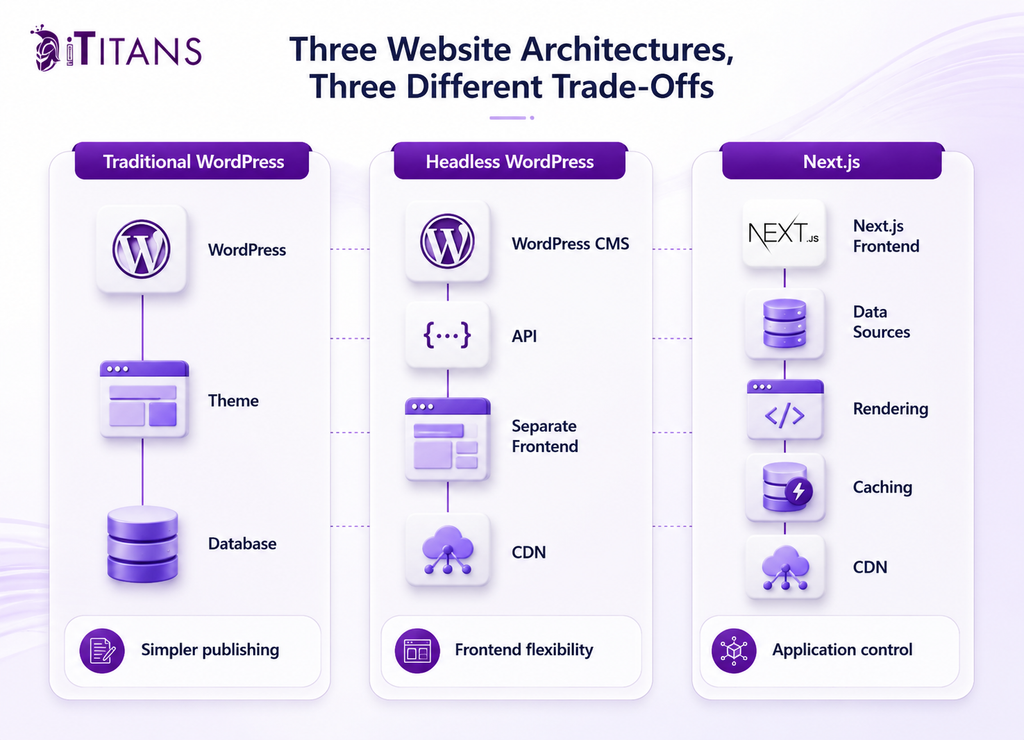
Traditional WordPress combines the content management system and frontend in one application. Content is created inside WordPress, stored in its database, and presented through a WordPress theme and PHP-based rendering system. This gives marketing teams a familiar publishing environment without requiring frontend developers for every content change.
Headless WordPress separates the CMS from the frontend. WordPress continues managing content, but the website frontend is built separately and retrieves content through an API. A common implementation uses WordPress with Next.js.
Next.js is different. It is a React framework used to build websites and web applications. It can consume content from WordPress, another CMS, APIs, databases, or multiple sources.
That means these technologies should not always be viewed as three mutually exclusive choices.
A company can use:
- Traditional WordPress for both CMS and frontend.
- WordPress as a headless CMS with Next.js as the frontend.
- Next.js with another CMS or custom backend.
- WordPress for marketing content while a separate application handles authenticated experiences.
This distinction is important when evaluating headless WordPress vs Next.js for enterprise websites. Headless WordPress describes an architectural approach, while Next.js describes the frontend framework used to build the presentation or application layer.
Why Traffic Volume Does Not Tell You Which Architecture to Choose
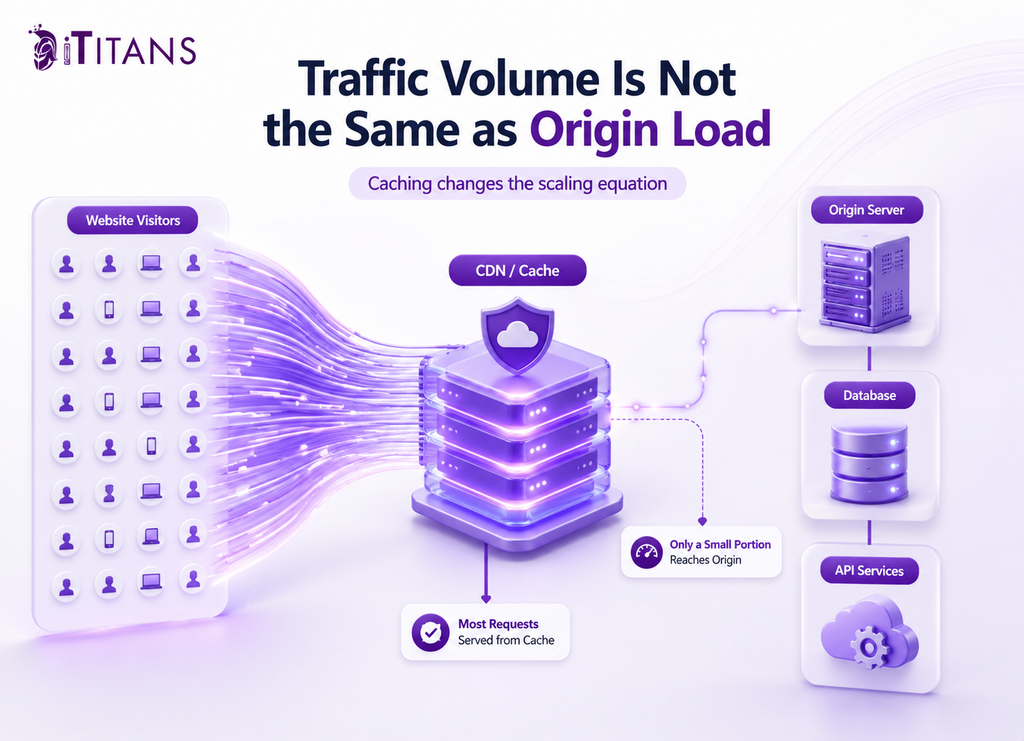
Traffic volume matters, but monthly visitors alone do not determine whether a website will scale.
A website receiving 1 million monthly visits can place relatively little pressure on its origin infrastructure if most requests are served from a CDN or page cache. Another website receiving 300,000 visits can experience serious performance problems if requests repeatedly trigger database queries, personalized processing, search operations, or third-party APIs.
That is why can WordPress handle millions of visitors has no universal numerical answer.
Look at Requests, Not Just Visitors
The more useful measurements are:
- Cache hit rate and origin request volume.
- Server response time for uncached requests.
- Database query volume and execution time.
- API latency and dependency failures.
- Traffic spikes rather than monthly averages.
- Core Web Vitals under real user conditions.
WordPress caching can substantially change the workload. WP Super Cache’s documentation explains that static HTML can be served instead of repeatedly processing WordPress PHP scripts, allowing cached pages to be delivered repeatedly without the same application processing for every visitor.
This means a high-traffic WordPress site is not necessarily asking PHP and MySQL to rebuild every page for every user.
Google’s current Core Web Vitals targets provide another objective measure. Good performance means LCP of 2.5 seconds or less, INP of 200 milliseconds or less, and CLS of 0.1 or less at the 75th percentile.
For a CTO, those measurements are more useful than saying a website has “too much traffic.”
When Traditional WordPress Is the Better Choice
Traditional WordPress remains a practical choice for many B2B technology companies whose websites are primarily content-driven.
If your site consists of service pages, blog posts, case studies, landing pages, resources, and lead-generation forms, keeping the CMS and frontend together can reduce operational complexity.
The biggest advantage is the publishing workflow.
Marketing teams can create and update pages directly. SEO teams can manage metadata and redirects through WordPress tools. Developers can use established WordPress plugins and themes. Editors can preview content without coordinating with a separate frontend deployment.
Performance does not automatically require a move away from WordPress.
WP Super Cache currently supports page caching, compression, CDN support, cache rebuilding, and cache preloading. Its documentation also explains that its fastest caching method can serve static HTML without executing PHP for the request.
When WordPress Is Usually Enough
Traditional WordPress deserves serious consideration when:
- Most website pages are public and cacheable.
- Content teams publish frequently.
- WordPress plugins are important to business operations.
- The site relies on standard SEO and marketing workflows.
- The frontend does not require complex application behavior.
- Current performance remains within acceptable Core Web Vitals targets.
In this situation, rebuilding the frontend because traffic has increased can create unnecessary cost.
The first step should be identifying the actual bottleneck.
A slow database query may require database optimization. Poor image delivery may require image optimization. Low cache efficiency may require better caching or CDN configuration. A heavy plugin may need replacement.
Changing the entire frontend is not automatically the correct solution.
When Headless WordPress Makes Sense
Headless WordPress becomes more attractive when a company wants to keep WordPress’s editorial capabilities but needs greater control over the frontend.
This often happens when the website starts behaving more like a digital application than a conventional marketing site.
A B2B SaaS company might use WordPress for its blog, case studies, resource library, and product content while its frontend needs several APIs, interactive components, custom search, personalization, or independent deployment cycles.
In that situation, is headless WordPress better for high traffic websites is not the best question.
The better question is whether separating the CMS and frontend solves a measurable business or engineering problem.
Headless WordPress can allow:
- Marketing teams to continue managing content in WordPress.
- Developers to build the frontend independently.
- Multiple digital experiences to consume the same content.
- Frontend deployments to occur without changing the CMS.
- Technologies such as Next.js to control rendering and frontend caching.
However, separation also creates additional dependencies.
Instead of one closely connected application, the architecture may involve WordPress, APIs, a frontend application, a CDN, hosting infrastructure, and third-party services.
Each boundary introduces potential failure points.
API latency can affect rendering. Cache invalidation can produce stale content. Preview environments can become harder to maintain. Authentication can become more complicated. A change to a content model can require corresponding frontend changes.
This is why headless WordPress should be adopted because the organization needs architectural separation, not because headless is automatically faster.
When Next.js Becomes the Stronger Option
Next.js becomes increasingly useful when the frontend needs application-level control over rendering, routing, data fetching, caching, and deployment.
One of its important capabilities is Incremental Static Regeneration. Current Next.js documentation explains that ISR allows static content to be updated without rebuilding the entire site and can reduce server load by serving prerendered pages. (nextjs.org)
This can be particularly useful for large content libraries.
Imagine a B2B technology company with thousands of documentation or resource pages. If those pages can be statically generated and cached, repeated visitors do not necessarily require the application to perform the same rendering work for every request.
Next.js also supports revalidation so that changed content can be refreshed without rebuilding every page.
Why This Matters at Higher Traffic
The advantage is not simply that Next.js is “faster.”
The advantage is greater control over how pages are generated and delivered.
A frontend can determine which content is:
- Generated ahead of a request.
- Cached and reused.
- Revalidated after content changes.
- Generated dynamically.
- Dependent on external APIs.
That control becomes increasingly useful when traffic spikes or when different sections of a website have very different rendering requirements.
This is why is Next.js better than WordPress for scalability can have a positive answer in certain architectures.
But Next.js is not immune to poor engineering.
Uncached routes, unnecessary client-side JavaScript, inefficient API calls, slow databases, and excessive third-party scripts can still produce poor performance.
Next.js also introduces infrastructure considerations. Its self-hosting documentation notes that cache management becomes important when applications run across multiple instances or containers because caching behavior needs to be considered across the deployment environment.
The framework provides more control. It does not remove the need for good architecture.
How Traffic Volume Should Influence Your Decision
There is no official traffic threshold at which WordPress stops working and headless or Next.js becomes mandatory.
Instead, traffic should determine how closely you monitor the architecture.
For planning purposes, these figures can serve as review points rather than hard technical limits:
| Monthly traffic | Architecture to evaluate first | Primary concern |
| Up to 100,000 | Traditional WordPress | Caching, hosting, plugins, database performance |
| 100,000 to 500,000 | WordPress or selective headless | Cache efficiency, integrations, frontend requirements |
| 500,000 to 2 million | Headless or optimized WordPress | CDN, origin load, APIs, traffic spikes |
| 2 million to 10 million | Headless WordPress or Next.js | Rendering model, caching, infrastructure, observability |
| Above 10 million | Architecture-specific load testing | Origin capacity, cache strategy, failure recovery |
These numbers should never be presented as failure limits.
A WordPress website can exceed 10 million monthly visits when the traffic profile, caching, hosting, database, and application are engineered appropriately.
Likewise, a Next.js website can experience problems at a fraction of that volume if every request triggers expensive backend work.
The purpose of these traffic bands is to identify when an architecture review becomes increasingly valuable.
What a Migration Really Costs
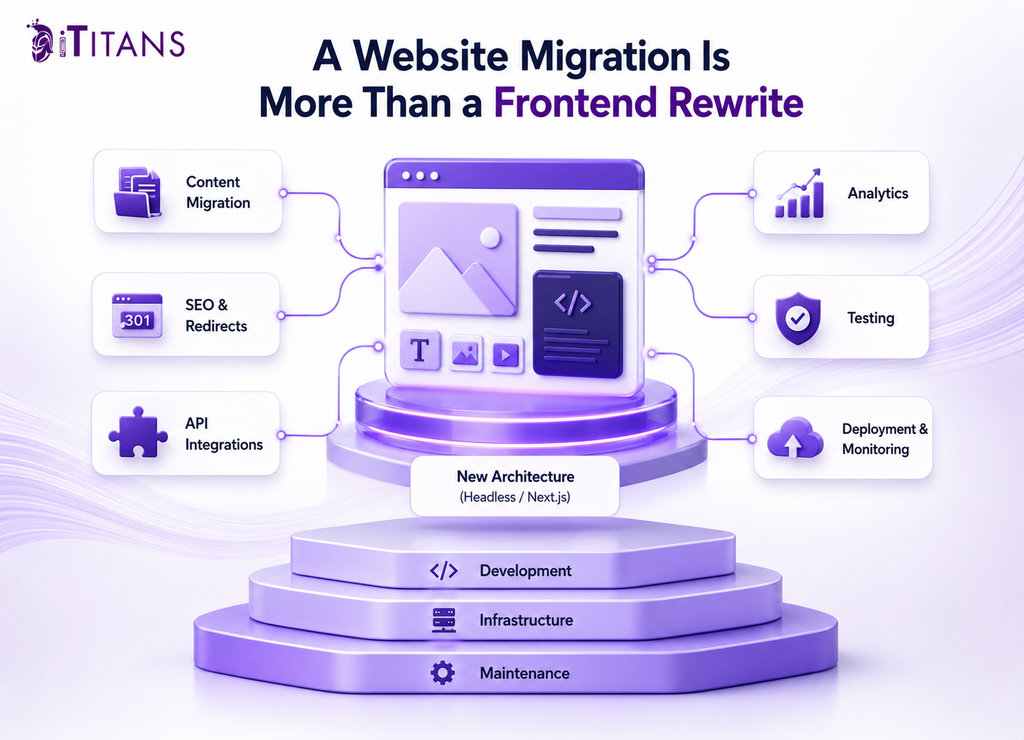
The visible development project is only part of the cost of moving from traditional WordPress to headless WordPress or Next.js.
A migration may require content model changes, API development, frontend development, redirects, analytics migration, SEO validation, testing, deployment infrastructure, monitoring, and new preview workflows.
That can create cost overruns when the project expands beyond its original scope.
Where Projects Commonly Expand
A migration often becomes more complicated when teams attempt to change several systems simultaneously:
- Rebuilding the entire website design.
- Reorganizing the content architecture.
- Replacing WordPress plugins.
- Rebuilding forms and marketing integrations.
- Introducing a new search system.
- Changing analytics implementation.
- Reworking navigation and information architecture.
- Migrating thousands of URLs.
These changes can create delayed launches and technical debt if they are not controlled.
There is also an ongoing maintenance difference.
Traditional WordPress requires management of core software, themes, plugins, hosting, databases, and integrations.
Headless WordPress adds API contracts and a separate frontend.
Next.js can add frontend dependencies, deployment pipelines, caching rules, application monitoring, and additional backend integrations.
Therefore, comparing only WordPress hosting against Next.js hosting produces an incomplete financial picture.
The relevant calculation is total cost of ownership, including engineering time, infrastructure, maintenance, incident response, content operations, testing, and opportunity cost.
What Founders and CTOs Should Measure Before Rebuilding
Before approving an architecture migration, establish a performance baseline.
Measure real users and production traffic instead of relying exclusively on development or staging environments.
The technical review should examine:
- Core Web Vitals.
- Cache hit and miss behavior.
- Origin request volume.
- Server response times.
- Database queries.
- API latency.
- Error rates.
- CPU and memory utilization.
- Traffic spikes.
- Third-party dependency performance.
It is also important to separate public and authenticated traffic.
A cached blog article and a personalized customer dashboard have completely different scaling characteristics.
If the problem is a slow database query, moving to Next.js may not solve it.
If the problem is poor cache configuration, rebuilding the frontend may be unnecessary.
If the marketing team cannot publish without engineering involvement, however, the architecture may be creating a genuine business constraint.
That distinction is critical for founders and CTOs because technical debt has an opportunity cost. Engineering hours spent maintaining an unnecessarily complex website cannot be spent improving the product, supporting customers, or shipping revenue-generating features.
WordPress vs Headless WordPress vs Next.js: Which Should You Choose?
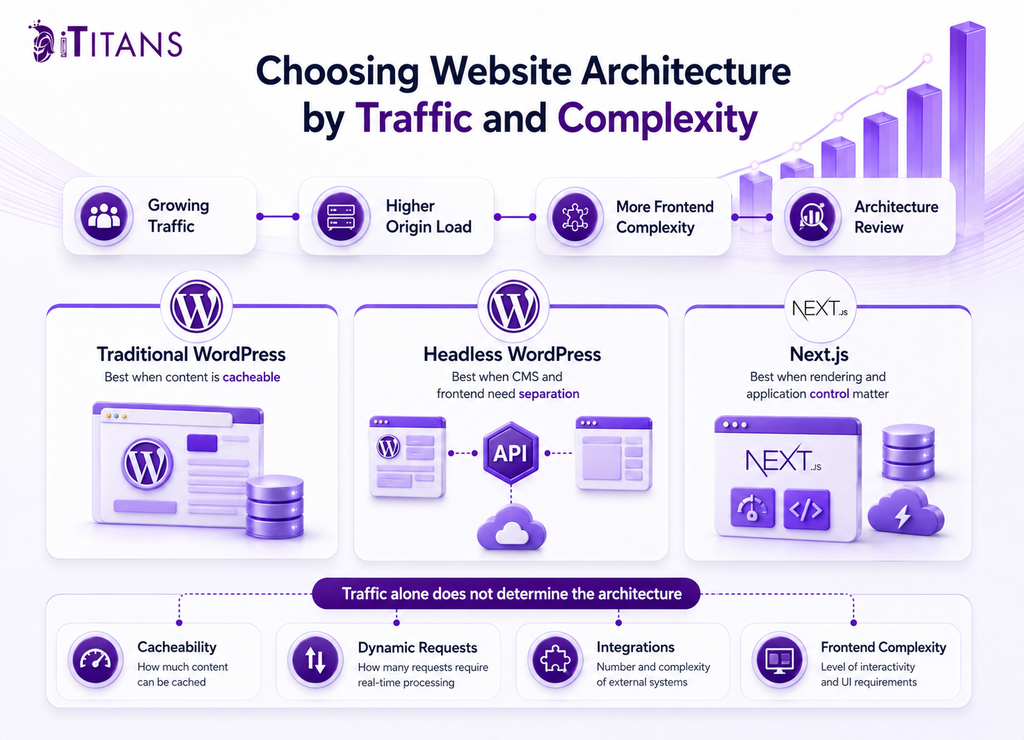
If your B2B website is primarily a content platform and properly configured WordPress meets your performance requirements, traditional WordPress is often the most practical choice.
If you want to retain WordPress for content management but need an independently controlled frontend, headless WordPress can provide the separation your team needs.
If the frontend increasingly behaves like an application and requires greater control over rendering, caching, APIs, routing, and deployments, Next.js may be the stronger architecture.
The central lesson from the WordPress vs Headless WordPress vs Next.js decision is that traffic volume should trigger investigation rather than dictate the technology.
A site receiving 2 million monthly visits does not automatically require a rewrite. A site receiving 200,000 visits may have a valid reason to change architecture if its existing platform is preventing performance improvements, integrations, or faster development.
The right architecture is the one that supports your actual traffic pattern, publishing requirements, engineering capacity, and growth plans without introducing unnecessary technical and maintenance costs.
Frequently Asked Questions
Can WordPress handle 1 million visitors a month?
Yes. WordPress can handle 1 million monthly visitors when caching, hosting, database performance, CDN delivery, and application architecture are properly configured. The workload reaching the origin matters more than the visitor count alone.
Is headless WordPress faster than traditional WordPress?
Headless WordPress can improve frontend delivery when the separate frontend uses effective static generation, caching, and CDN delivery. However, API latency and poor cache design can introduce new performance bottlenecks.
Should a high traffic website use Next.js?
Not automatically. Next.js is worth considering when high traffic is combined with complex frontend requirements, dynamic data, static generation needs, or the need for greater control over rendering and caching.
What traffic level requires headless WordPress?
There is no fixed traffic level that requires headless WordPress. The stronger trigger is a combination of traffic patterns, frontend limitations, integrations, performance requirements, and independent deployment needs.
Is WordPress or Next.js better for SEO?
Both can support strong SEO when implemented correctly. WordPress provides mature publishing and SEO workflows, while Next.js gives developers direct control over technical rendering, metadata, routing, structured data, and frontend performance.
Does headless WordPress reduce server load?
It can reduce frontend rendering work on the WordPress side when content is delivered through a separately cached frontend. The WordPress API and the frontend infrastructure still need appropriate caching and capacity planning.
When should a company migrate from WordPress to Next.js?
Migration makes sense when the current WordPress architecture creates measurable limitations around performance, frontend functionality, deployment, integrations, or development speed. Traffic growth should be considered alongside those constraints rather than used as the only migration trigger.
Is Next.js cheaper than WordPress for high traffic websites?
Not necessarily. Next.js can reduce some rendering workload through static generation and caching, but development, deployment, monitoring, and maintenance requirements can increase. Total cost depends on the application’s architecture and the team’s technical capabilities.
Need Help Choosing the Right Architecture?
Choosing between WordPress, headless WordPress, and Next.js should start with your traffic data, performance metrics, content workflow, and business requirements.
iTitans can assess your existing architecture and help determine whether optimization, headless WordPress, or a Next.js frontend is justified by the actual technical and business constraints.